Rishabh Anand

Goosthetic
Steam Link: https://store.steampowered.com/app/3573020/Goosthetic/
Date: September 2023 - December 2024
Role: Graphics and Gameplay Programmer
Type: Academic
Description:
Goosthetic is a fast paced movement shooter where you take the role of a test subject equipped with a goo arm and smart pistol, as you try to escape the facility as fast and stylishly as you can.
We used Unreal Engine 5 to develop Goosthetic. We worked on Goosthetic for 3 semesters and plan on releasing it to Steam soon. Goosthetic is the biggest project I have worked on with over 20 contributers of varying disciplines. I was the graphics programmer and a gameplay programmer on the game and collaborated heavily with artists.
Key Points:
Worked on movement mechanics including initial version of wall run component which later was expanded upon by other gameplay programmers
Created first pass of Cell Shader and Outline Shader which were expanded upon by artists
Created and implemented almost all VFX in the game with the VFX artist
Created Particle Systems in Niagara and implemented them through Blueprints
Goo Splatter, Goo Decals, Glass Shattering, etc.
Created UX features to enhance the feel of movement and shooting in game
Gun Recoil, Camera Shake when shooting, Jump and land camera shake, head bobbing, etc.


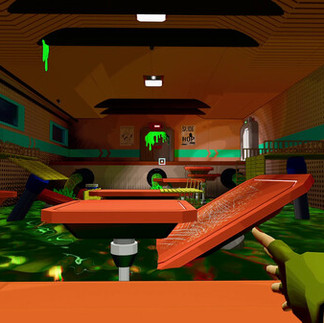


Decal Projector:
Introduction
The decal projector is designed to project animated decals through a global blueprint with functions for various decal types. To my knowledge, Unreal Engine's default decal projection does not allow for dynamic modification of material variables. In our case, we need to adjust a variable across all decals to enable them to expand.
System Overview
Each decal is created as a decal blueprint with a timeline that modifies the material variable, allowing the decals to expand. This approach also offers the added benefit of selecting a random decal material instance, providing more variety and reducing monotony. By expanding decals based on an opacity texture, we achieve a much smoother and more visually appealing effect compared to the fade-in decals we used earlier this semester. Additionally, using a global decal projector allows any blueprint that needs to project decals to simply reference the global projector and call a function, making decal projection quick and efficient.
Usages
The decal projector is utilized in every instance where decals are projected. Both player and enemy projectiles rely on it for decal placement. Additionally, Niagara systems that generate large volumes of particles with collision events use the decal projector to project decals at the points of impact. This can be seen in enemy explosions and the vat explosion demonstrated below.
VFX:
Goo was a significant element of our games' identity, and to fully capitalize on its potential, we developed a diverse array of visual effects (VFX) designed to highlight this motif. This involved the creation of multiple Niagara systems, which allowed us to craft intricate particle effects that brought the goo to life in various contexts. Additionally, we animated textures that could seamlessly integrate with our environments, enhancing the overall aesthetic and immersion. To further showcase these effects, we employed the decal projector, as previously mentioned, which enabled us to project these dynamic visuals onto surfaces in a way that felt organic and engaging. By combining these techniques, we ensured that the goo not only served as a gameplay mechanic but also as a visually striking element that reinforced the unique atmosphere of our games.
Above, you can see the various animated textures that we used throughout the game. The top left one shows footprints, which are visible whenever the player moves, while the others are variations used for any goo splatter effects that occur, usually from bullets and explosions.

Above is the material for the splatter decals. We would pass time as a variable for expanding the mesh. By increasing the alpha with the specific texture we used, it gave the impression that the splatter was expanding from the point of impact.
One of the coolest VFX we worked on was the goo faucet, which was done using mesh deformation and Niagara. In order to achieve the intended effect, we would spawn mesh particles from a location and give them gravity such that they would fall along the path. We then would spawn enough particles so that there were no gaps between each mesh. From there, we deformed the mesh along its path so that it would look like it was an actual liquid being affected by gravity. Combining this with another simple particle splashing Niagara System and an animated ripple decal gave the impression of a viscous liquid releasing at high speed.